

1. Prerequisites
Dolibarr 18 to 24 with PHP 7.4 to 8.3. Nothing else: no Composer, no server binary, the module uses the PDF engine shipped with Dolibarr. Prepare your annexes as unprotected PDFs (terms of sales, bank details, brochure).
Prerequisites, installation in custom/, configuration, first test and update. Start on a copy of your database.
Dolibarr 18 to 24 with PHP 7.4 to 8.3. Nothing else: no Composer, no server binary, the module uses the PDF engine shipped with Dolibarr. Prepare your annexes as unprotected PDFs (terms of sales, bank details, brochure).
Download the archive from Dolistore and unzip it into custom/pdfannexes, or deploy it from Home → Setup → Modules/Applications → Deploy external module. Enable PDF Annexes and open its setup with the gear icon.
Click “New rule”, name it “Terms of sales”, tick Quotes, Orders and Invoices, upload your terms PDF (it is checked at once and its page count displayed), keep the position “After the document (end)” and save. The rule appears in the table as active.
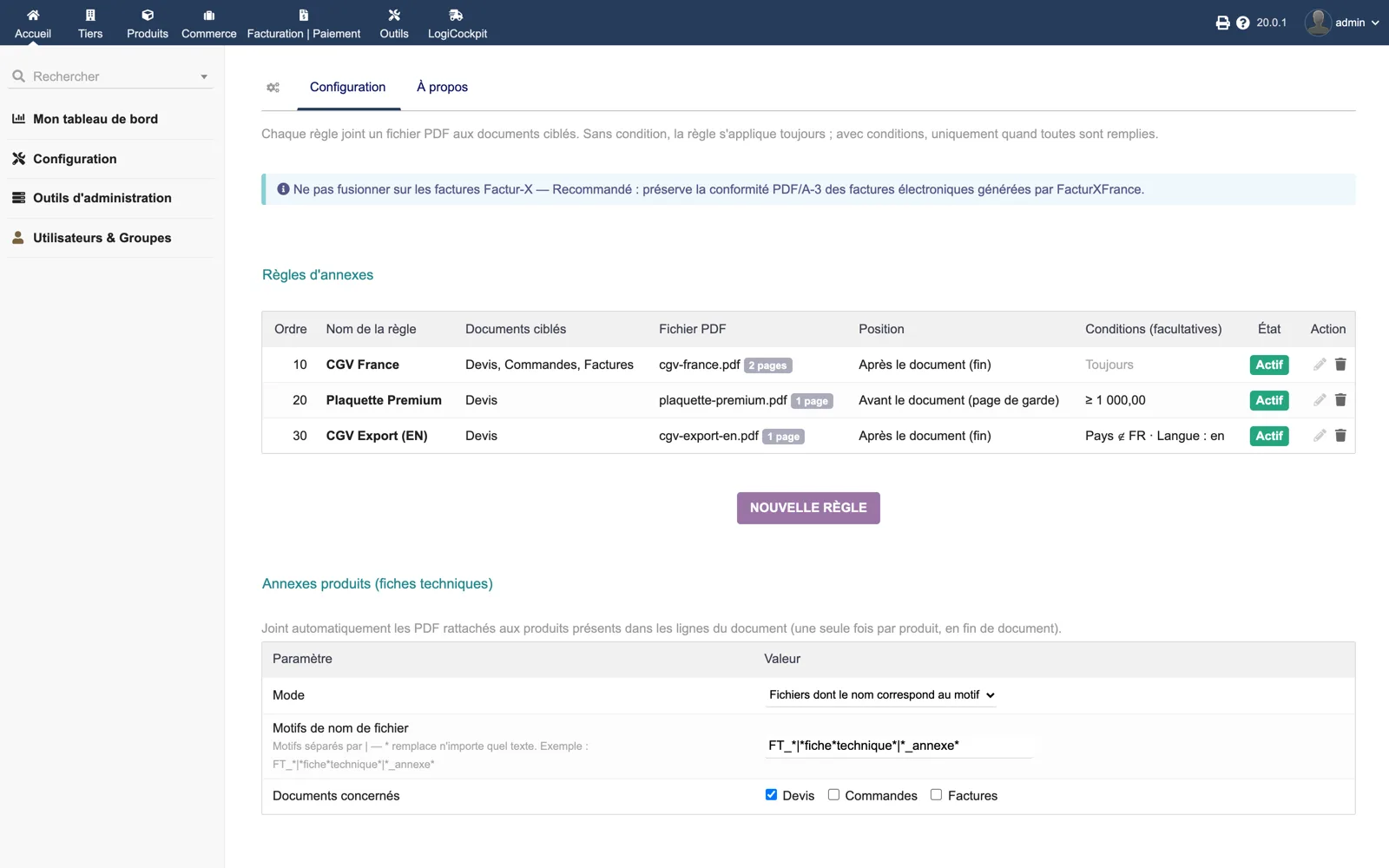
Create further rules with conditions: a brochure “Before the document (cover)” with a minimum amount incl. tax, export terms with the country condition “Third party country NOT IN the list” and FR, or English terms with the language en. Order decides the merge sequence between rules.
In the product annexes section, keep the pattern mode, adjust the file name patterns (FT_* by default, among others) and tick the document types concerned. Attach a PDF named accordingly to a product: it will be appended once at the end of the documents that contain that product.
Open a quote, click Generate in the attached files box and open the PDF: the annexes must appear at the chosen positions. Send the quote by e-mail from Dolibarr: the attachment is the merged file. If Factur-X France is enabled, check that an invoice in a Factur-X context is left untouched.
Replace the custom/pdfannexes directory with the new version, then disable and re-enable the module. Rules and uploaded files are kept.