Prerequisites, installation in custom/, configuration, first test and update. Start on a copy of your database.
Updated 9 October 2026 · Dolibarr 18 → 24 · PHP 7.4 – 8.3 · version 1.0.0
1. Prerequisites
Dolibarr 18 to 24, PHP 7.4 to 8.3 with the cURL and OpenSSL extensions, the Products module active and, depending on your flows, Orders, Shipments, Supplier orders and Receptions. Fill in the customs code of your products. Operators also need a web-service user in the EUDR information system (profile → Web Services Access) and their EORI number.
2. Install the module
Unzip the archive into custom/ (custom/eudrtrace) and activate EUDR Trace in Home → Setup → Modules/Applications (Products family). Four permissions are created: read, write, submit to the information system, and configure. An EUDR top menu appears with Dashboard, Reference register, Declarations, Plots, Relevant products and Countries.
3. Choose your profile
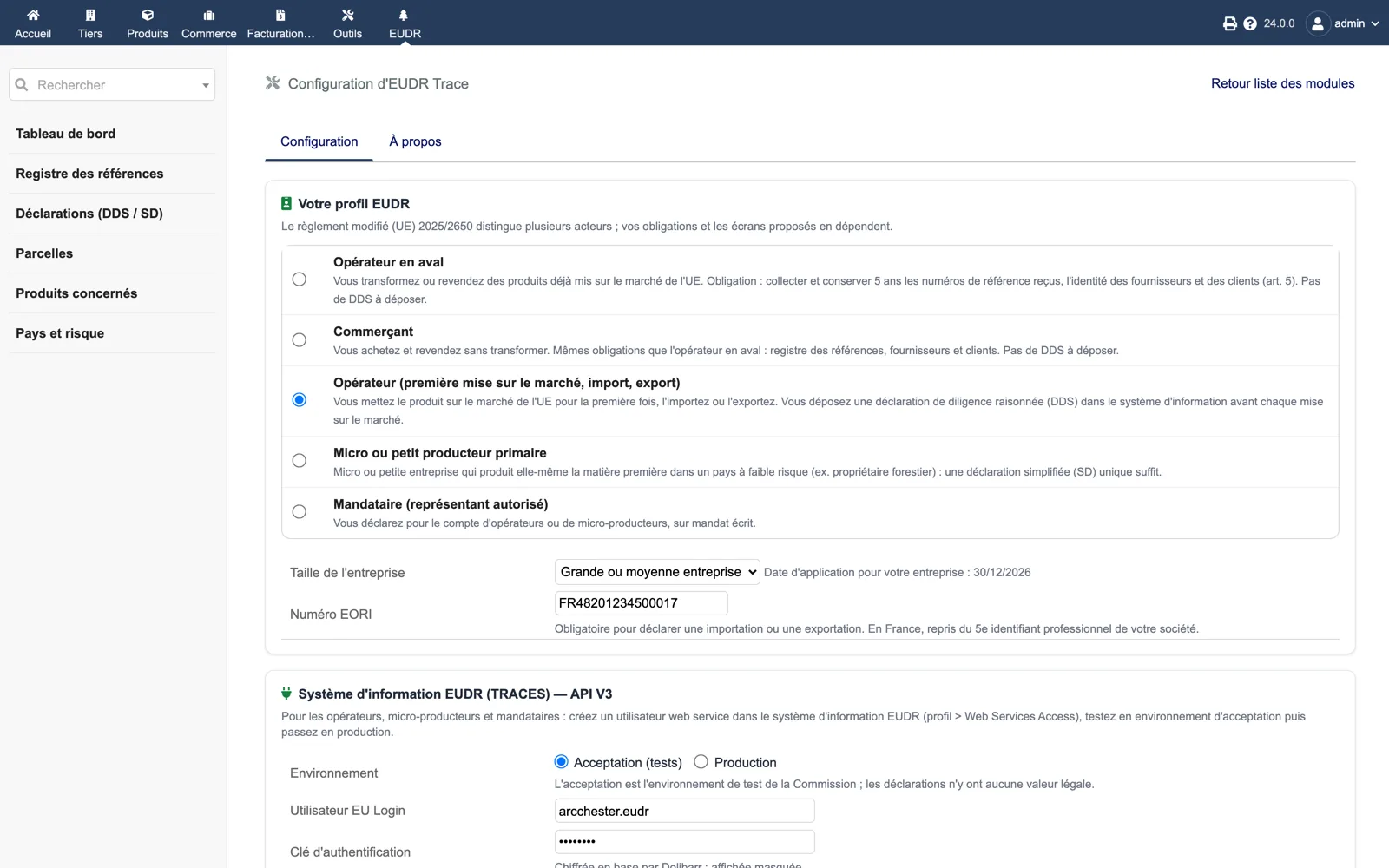
In EUDR → Setup, pick the role (downstream operator, trader, operator, micro producer, representative), the company size and the EORI number. Leave automatic pass-on enabled and decide whether validation is blocked without reference and whether references are printed on PDFs.
4. Confirm the relevant products
Open EUDR → Relevant products. Products detected from their customs code are listed: confirm the commodity and HS code, enter species for wood, then save. Products without a customs code are not detected: complete the product card first.
5. Record a first upstream reference
On a purchase order or reception containing a relevant product, open the EUDR tab and enter the reference number and verification number received from the supplier. A wrong format is refused. The line appears in the register as “received (upstream)”.
6. Check the pass-on
Validate a sales order, shipment or invoice for the same product. The EUDR tab must show the product as covered, the green panel on the card must list the reference, and the generated PDF must print it. With the blocking option on, a product without reference prevents validation with an explicit message.
7. Operators: test a DDS in acceptance
In the setup, enter the EU Login user, the authentication key and the WebServiceClientId, choose Acceptance (tests) and test the connection. Create a plot (GeoJSON or GPS point) for a supplier, then “Prepare a DDS” from a purchase order. Fix the blocking points, submit, and enable the 30-minute scheduled task: the reference and verification numbers must appear on the declaration card. Switch to Production only after that.
8. Update
Replace custom/eudrtrace with the new version, then disable and re-enable the module so that new tables, columns and the scheduled task are refreshed. The audit trail and register are never purged.