Prerequisites, installation in custom/, configuration, first test and update. Start on a copy of your database.
Updated 9 October 2026 · Dolibarr 18 → 24 · PHP 7.4 – 8.3 · version 1.0.0
1. Prerequisites
Dolibarr 18 to 24, PHP 7.4 to 8.3, the Products and Invoices modules (plus Shipments if you compute from shipments). Delivery addresses on your customers’ documents and the customer type on third parties improve the computation. Have your contracts at hand: IDU, LUCID number, dual system contract, fee schedules.
2. Install the module
Unzip the archive into custom/ (custom/packtrace) and activate PackTrace in Home → Setup → Modules/Applications (Products family). Four permissions are created: read, write catalogue and compositions, compute and export reports, configure. A Packaging top menu appears.
3. Set the role and the source
In Packaging → Setup, choose the company role (manufacturer or brand, importer, distributor), the source of quantities (validated invoices or validated shipments), whether credit notes are deducted, the default channel, the signatory of the declaration of conformity and whether EPR numbers are printed on PDFs.
4. Enter your registrations
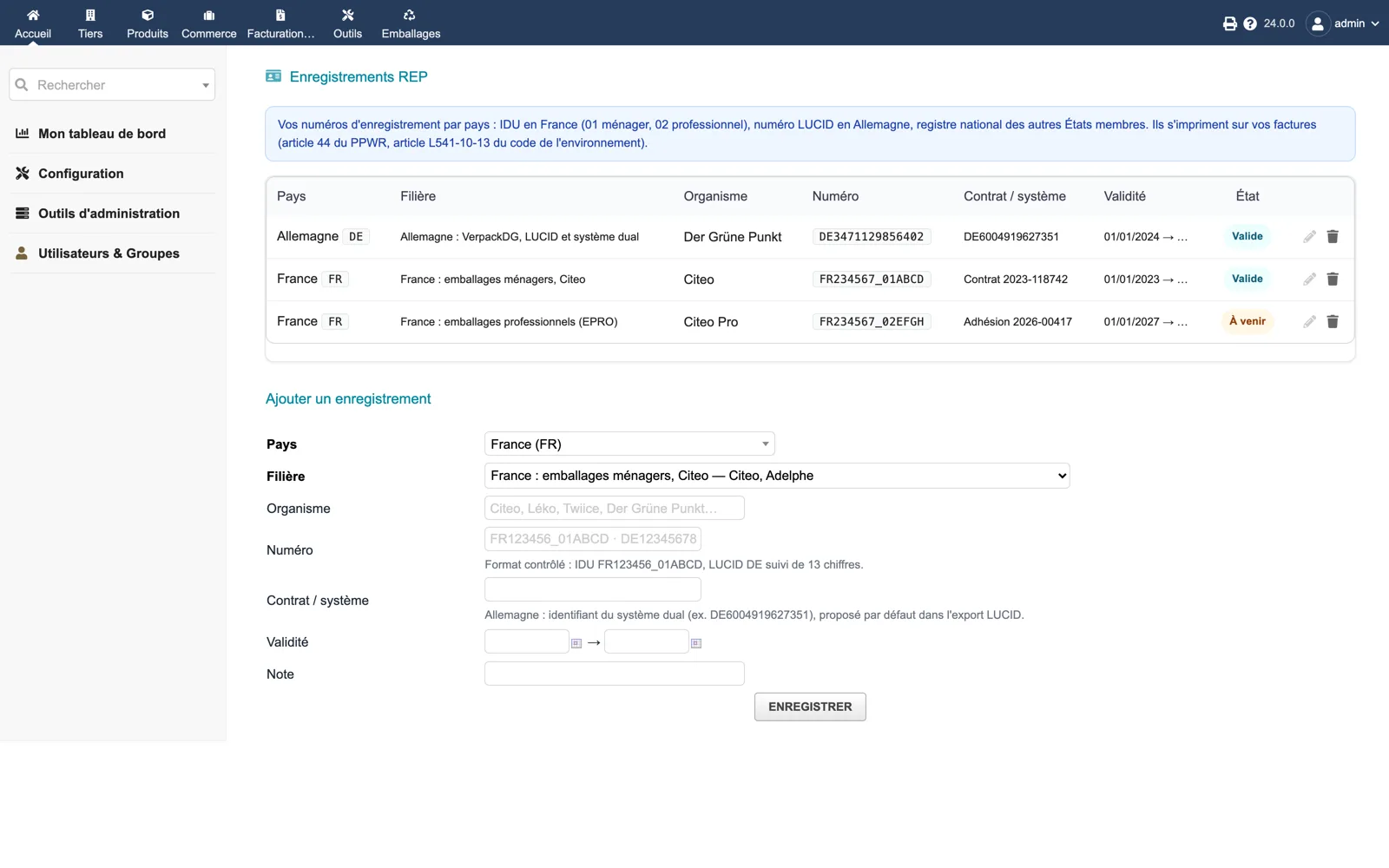
Under Packaging → Registrations, add one line per country and scheme: IDU for Citeo or Léko household and for EPRO, LUCID number with the dual system contract for Germany. The format is checked; the status shows valid or upcoming.
5. Describe the packaging elements
Under Packaging → Packaging catalogue, create each element: material (the PPWR, Citeo, Léko, EPRO and LUCID categories follow), weight, level and type, recycled content, recyclability grade, PFAS, heavy metals, food contact, reuse, supplier. The completeness column tells you what is missing.
6. Compose the products
Open the Packaging tab of each product and add the elements with the quantity per unit sold (0.1667 for a box of six). Use the copy box for similar products. The dashboard list “Products sold without packaging” drives the work until it is empty.
7. Compute and check a report
Under Packaging → EPR reports, create a report for a scheme, a country and a period, then compute. Check the weights per category against a known product, resolve the alerts, validate, download the CSV, per-unit file or LUCID XML, file it on the portal and mark the report as filed with the reference returned.
8. Update
Replace custom/packtrace with the new version, then disable and re-enable the module. Fee schedules you edited and your registrations are kept; new schedule years are added as they are published with the module.