Prerequisites, installation in custom/, configuration, first test and update. Start on a copy of your database.
Updated 9 October 2026 · Dolibarr 20 → 24 · PHP 7.4 – 8.3 · version 1.1.0
1. Prerequisites
Dolibarr 20 to 24 with PHP 7.4 to 8.3 and the cURL extension (OpenSSL recommended for AES-256 encryption of secrets). The Banks module enabled and a Dolibarr bank account per real account. The Scheduled jobs module enabled, with a scheduler that really runs it. Qonto API credentials, or a GoCardless Bank Account Data account for other banks. Work on a copy of your database first.
2. Install the module
Download the archive from Dolistore and unzip it into the custom/ directory of Dolibarr (custom/dolibanksync). In Home → Setup → Modules/Applications, activate the module; it appears as DoliBank Sync in the Bank menu. Grant the four permissions (read, process lines, manage connections, configure) to the right users.
3. Connect Qonto
Bank → DoliBank Sync → Bank connections → New connection, provider “Qonto (API)”. Enter the organisation login and the API key generated in Qonto (Settings → Integrations and partnerships → API key), then test. The accounts of the organisation are listed: map each one to a Dolibarr bank account and tick those to fetch.
4. Or connect through open banking
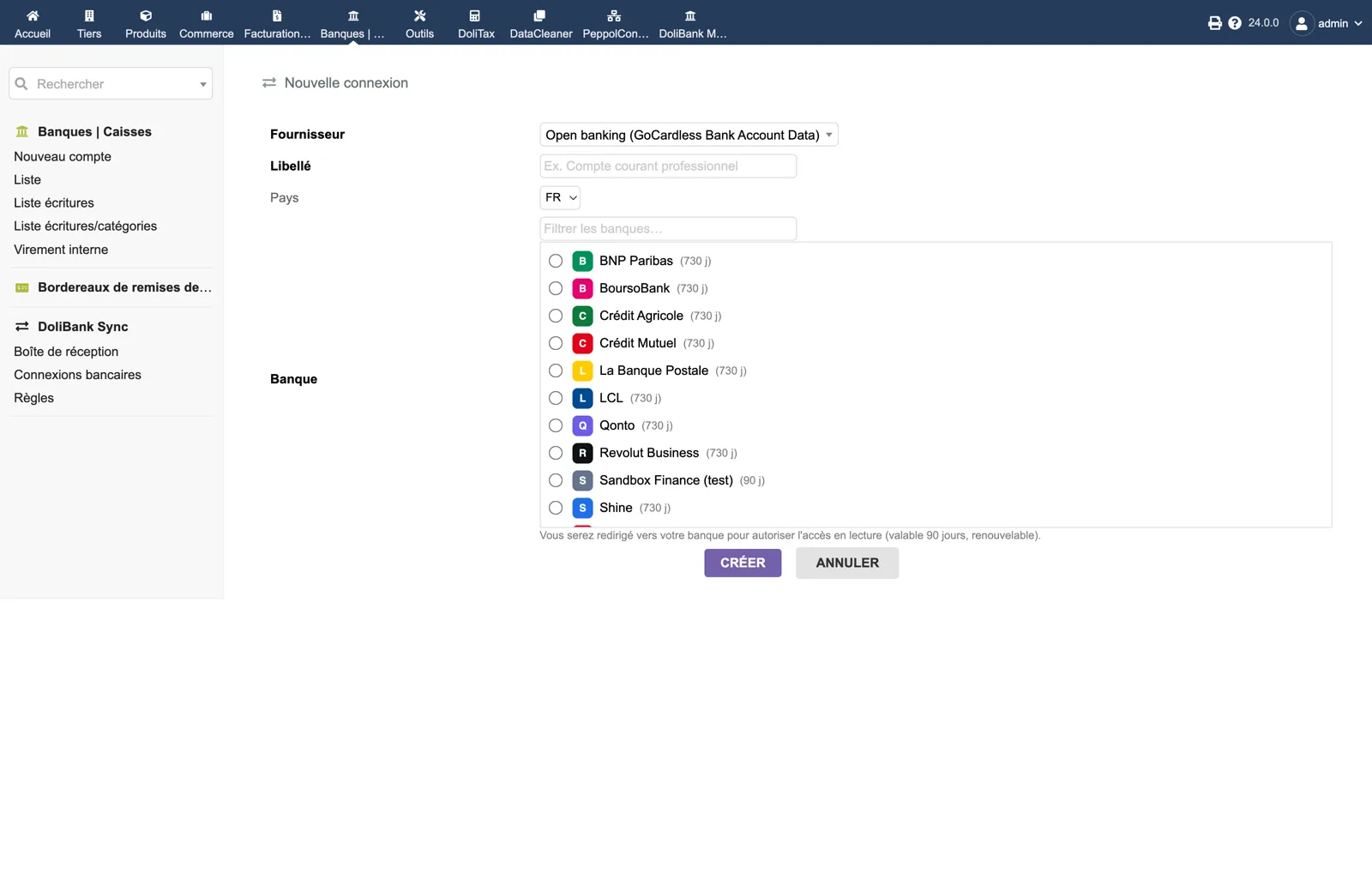
In the module setup, enter the Secret ID and Secret Key of your GoCardless Bank Account Data account (created on bankaccountdata.gocardless.com, “User secrets”) and click “Test GoCardless access”. Then create a connection with provider “Open banking”, pick the country and the bank, and give consent on the bank’s website. Back in Dolibarr, map the accounts.
5. First fetch and inbox
Click “Fetch now” on the connection. The dashboard must show the bank balance next to the Dolibarr balance for each account, and the inbox must list the new lines. Open a line, match an open invoice or create a paid supplier invoice, and check in Dolibarr that the payment is linked to the existing bank line without a duplicate.
6. Rules, batch and routine
From a processed line, create a pre-filled rule so the next similar transaction arrives with its proposal. For exact invoice matches, select up to 50 lines and use batch reconciliation. Leave the hourly job “DoliBank Sync - Automatic bank fetch” enabled; the daily consent check warns you by e-mail before an open-banking consent expires.
7. Update
Replace the custom/dolibanksync directory with the new version, then disable and re-enable the module so Dolibarr registers new tables, menus and scheduled jobs. Connections and secrets are kept.