Prerequisites, installation in custom/, configuration, first test and update. Start on a copy of your database.
Updated 9 October 2026 · Dolibarr 18 → 24 · PHP 7.4 – 8.3 · version 1.8.8
1. Prerequisites
Dolibarr 18 to 24 with PHP 7.4 to 8.3 and the cURL extension; the Products, Orders and Third parties modules enabled (Stock for inventory, Variants for combinations). A Dolibarr reachable over HTTPS from the internet, because Shopify calls the webhook. Work on a copy of your database and, if possible, a development store first.
2. Create the Shopify app
Shopify no longer lets you create a legacy custom app from the store admin. Create an app in the Shopify Dev Dashboard with the Admin API scopes for products, orders, inventory, customers, fulfillments and locations, plus read_publications and write_publications to publish on the Online Store. Copy its client ID and client secret. A custom app created earlier keeps working with its shpat_ token.
3. Install the module
Download the archive from Dolistore and unzip it into custom/shopifysync, or deploy it from Home → Setup → Modules/Applications → Deploy external module. Enable Shopify Sync. The module needs no Composer package or SDK.
4. Connect the store
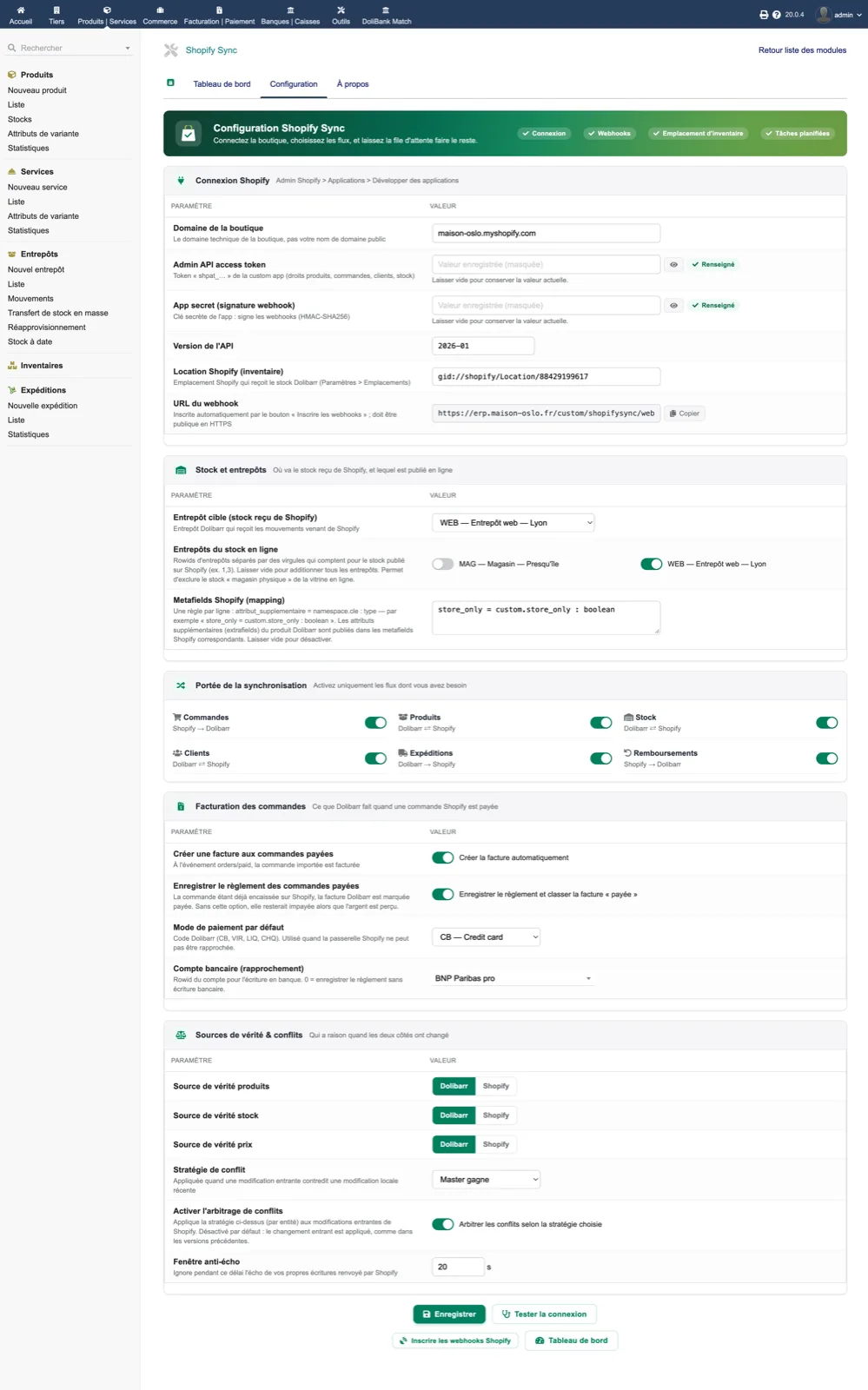
In the module setup, enter the store domain, choose the authentication mode (pasted token, or client ID and secret), paste the credentials and keep the API version at 2026-01. Select the inventory location and the target warehouse. Click “Test connection”: every check must be green, and each warning says what to fix.
5. Choose flows and sources of truth
Switch on only the flows you need (orders, products, stock, customers, shipments, refunds), set the source of truth for products, stock and prices, and decide whether paid orders create an invoice and record the payment. Then click “Register Shopify webhooks”. The six-step setup assistant can do this for you, including SKU linking for an existing catalogue.
6. Enable the scheduled tasks
In Home → Setup → Scheduled jobs, enable the queue processing and reconciliation tasks. On Dolibarr 24, add $dolibarr_cron_allow_cli = 1 to conf/conf.php, otherwise command-line tasks are counted as errors.
7. Run a first test
Place a test order in Shopify: within the next queue run, the order must appear in Dolibarr with its lines, and the dashboard must show the job as done. Edit a Dolibarr product and check it on Shopify. If your catalogue already exists on both sides, use “Link variants by SKU” and then “Catch up orders from the last N days” from the dashboard.
8. Update
Back up the database and documents, replace the custom/shopifysync directory with the new version, then disable and re-enable the module so that new tables and hooks are registered; settings are kept. New options are off by default, so an existing installation behaves as before until you switch them on.