Does it replace the native shipment and invoice screens?
No, it drives them. The cockpit creates the same shipments and invoices as Dolibarr, through the same classes, so stock, triggers, accounting and document generation behave as usual. You can still open any order, delivery note or invoice from the cockpit.
How is the stock badge computed?
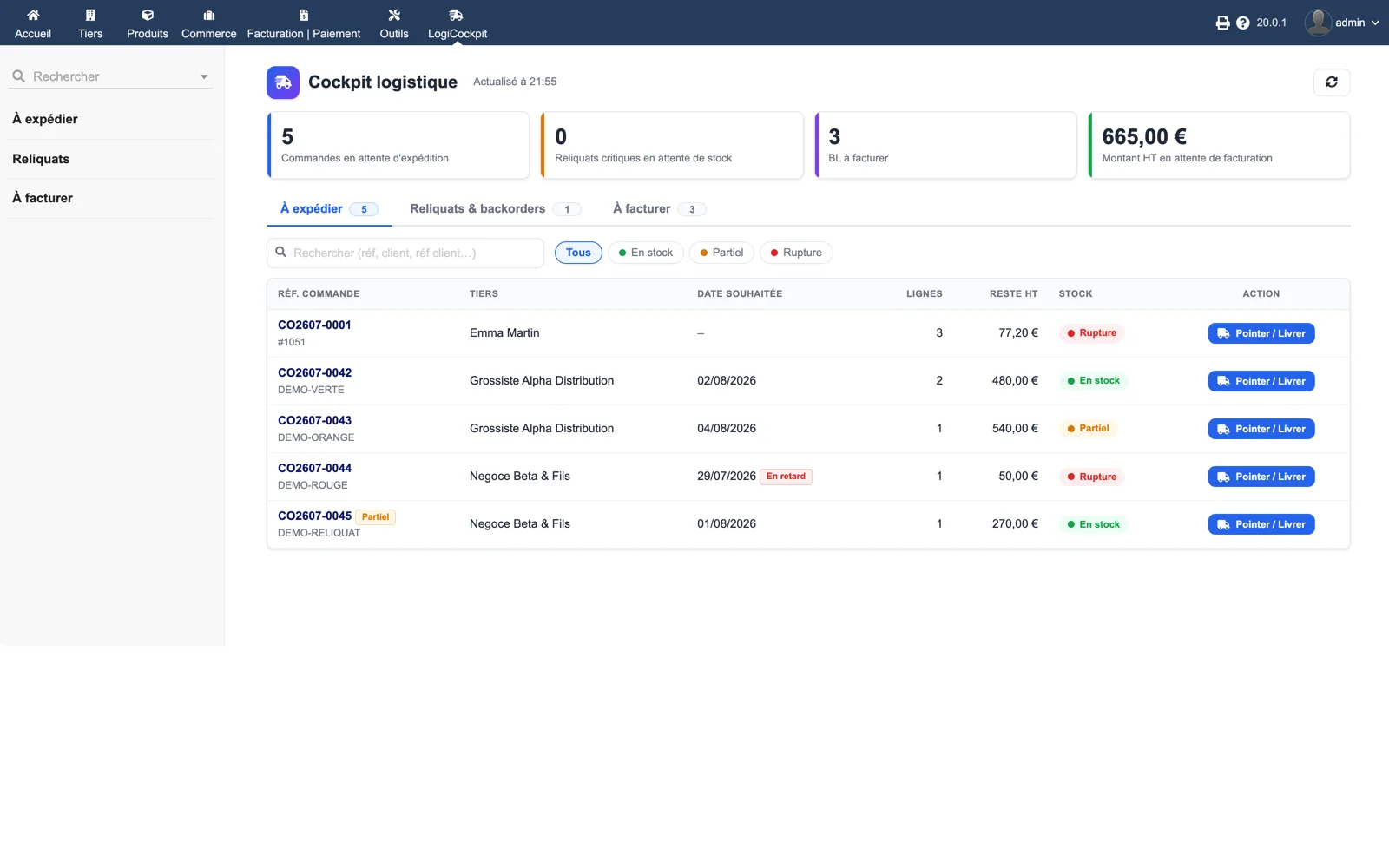
Product by product, on real stock: green when every line can be shipped in full, orange when only part can, red when nothing can. The drawer also shows the stock per warehouse and suggests the best-stocked warehouse.
Can I use a barcode scanner?
Yes. In the quick-dispatch drawer, scanning a product reference or barcode and pressing Enter adds one to the matching line. Enter moves to the next line, the last line validates, Escape closes.
What exactly goes into a batch invoice?
The lines of the selected delivery notes, with prices, VAT, discounts, units and extra fields taken from the source order lines, and optionally a separator line before each note such as “--- Delivery note SH2607-0018 dated 31/07/2026 ---”. Invoices are created as drafts for review unless you enable automatic validation.
Which settings are available?
Separator line on or off, automatic invoice validation, closing of billed delivery notes, automatic classification of fully shipped orders, automatic validation of backorder sub-orders, default warehouse, maximum rows and KPI refresh interval.