

No more line-by-line searching
For each bank operation the engine ranks the open documents and shows the evidence behind the score: exact amount, reference found, same third party, date within 7 days. An identical amount alone is never enough.
Drop the statement exported from your bank. The engine scores the open invoices, salaries, charges and expense reports for each line and shows its reasons. You validate, the module creates the native Dolibarr payment.
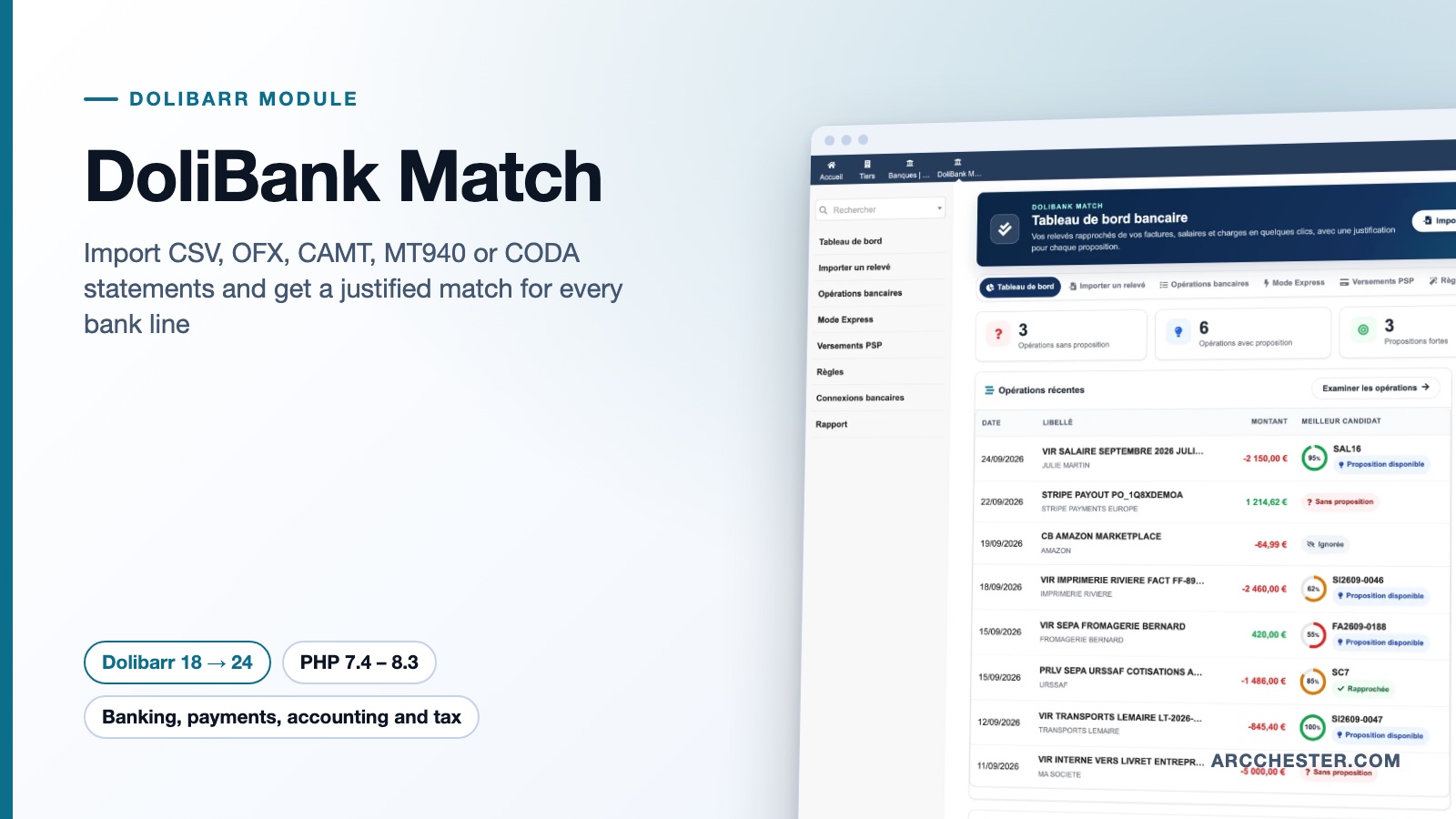
For each bank operation the engine ranks the open documents and shows the evidence behind the score: exact amount, reference found, same third party, date within 7 days. An identical amount alone is never enough.
Once you validate, the module creates the Dolibarr payment (customer, supplier, salary, social charge, expense report, bank fee or internal transfer), settles the document and links the bank line.
Express mode queues operations by confidence: right arrow to validate, left to ignore, down to skip. A single transfer covering two or three invoices of the same customer is validated in one go.
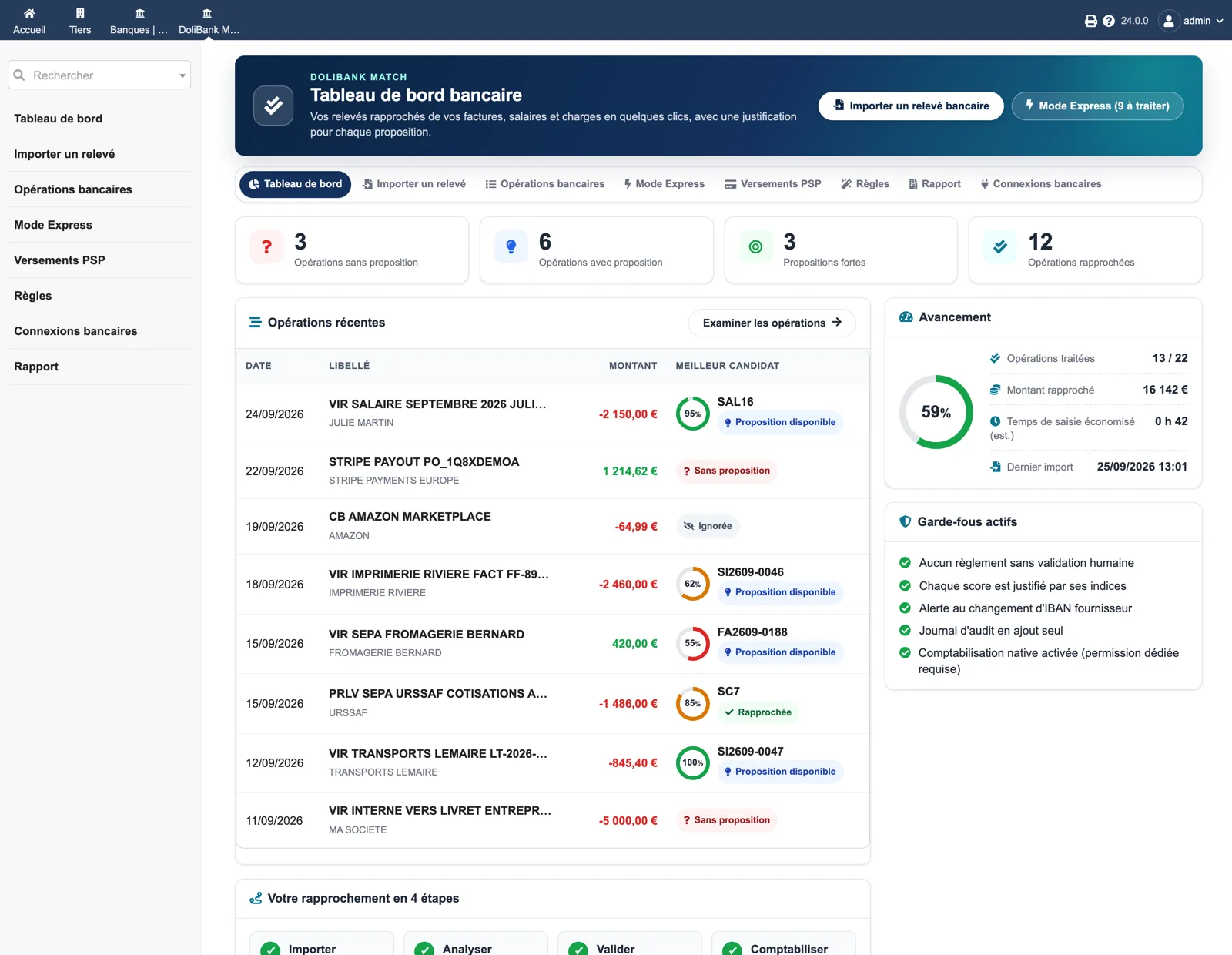
Four counters (no proposal, with proposal, strong proposals, reconciled), the recent operations with their best candidate and confidence gauge, a progress panel with reconciled amount and estimated time saved, and the list of active safeguards.
Browse all screens →| Workflow | Trigger | Result in Dolibarr |
|---|---|---|
| Statement import | CSV, OFX, QIF, CAMT.052/.053/.054, MT940 or CODA file | Format detected, full preview, rejected lines explained, duplicates blocked by SHA-256 fingerprint. |
| Analysis | Button “Analyse up to 100 operations” | Candidates among customer and supplier invoices, salaries, charges and expense reports, each with its score and evidence. |
| Validation | Express mode or detailed reconciliation screen | Decision prepared, then validated by a user holding the reconciliation permission. |
| Posting | Dedicated permission plus setup option | Native Dolibarr payment created, document settled, bank line linked. Never twice for the same operation. |
| PSP payouts | Normalized Stripe, PayPal or Shopify Payments payout | Gross − fees = net checked against the proposed bank operation before confirmation. |
| Report | Period and bank account filter | Printable reconciliation report and accounting CSV export for your accountant. |
CSV/TXT (delimiter, encoding and columns detected), OFX 1 and 2, QIF, ISO 20022 CAMT.052/.053/.054, MT940/STA and CODA 2.x. A CSV only needs a date, a label and either an amount column or debit and credit columns.
No. Rules and IBAN learning only produce suggestions. A payment is created only after a human validation, and posting also needs the dedicated permission plus the “Allow native posting” option, which is off by default.
Each import is fingerprinted with SHA-256. Re-importing the same file on the same account is refused and no line is duplicated. Rejected lines are listed with their reason.
When a supplier payment leaves to an IBAN different from the ones known for that supplier, the proposal is flagged in red and removed from the “very likely” zone, so it cannot pass through quick validation unnoticed.
Yes, since 1.5.0. Unpaid salaries, social or tax charges and approved expense reports are proposed against debits only and paid natively through the Dolibarr Salaries, Taxes and Expense reports modules when they are enabled.
Not on its own. The companion module Qonto Sync fetches transactions from Qonto or GoCardless Bank Account Data and can feed them straight into the DoliBank Match engine.
€149 excl. VAT · one-time purchase · version 1.5.0
Dolistore is the official Dolibarr marketplace: purchase, download and invoicing happen there. You receive the module archive, French and English translations, e-mail support at support@arcchester.com and the updates published on Dolistore.