

Five datasets
Export contacts, products, customer invoices and vendor bills.
Export Odoo customers, vendors, products, invoices and bills to CSV for QuickBooks Online. A free module for migration or accounting hand-off, without an API.
Export contacts, products, customer invoices and vendor bills.
Split exports without separating the lines of the same invoice.
Download UTF-8 CSV files and review them before importing into QuickBooks.
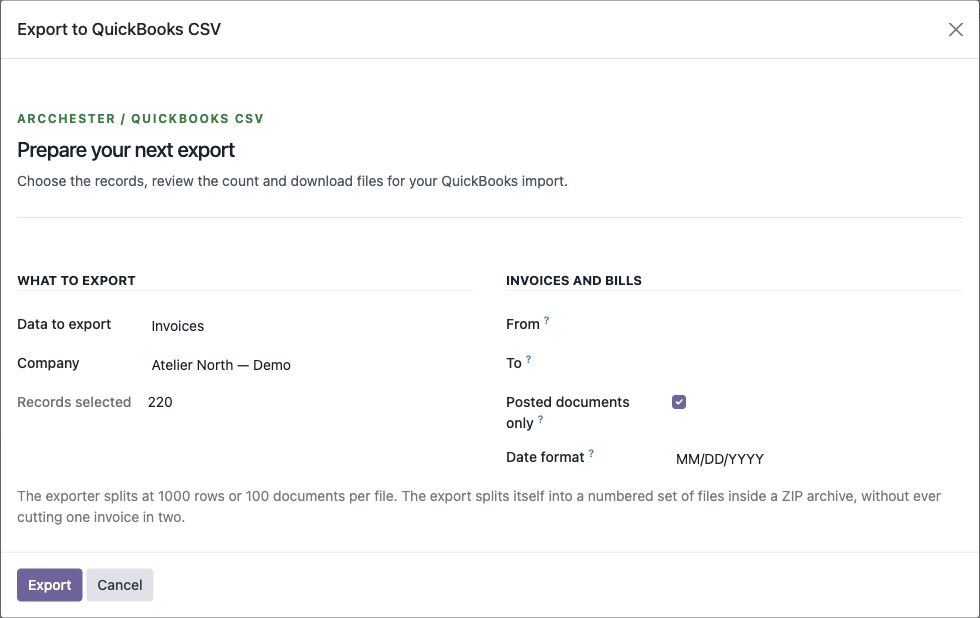
Select the dataset, date range and date format. Review the record count before downloading.
Explore the illustrated workflow →| Workflow | Direction / trigger | Result |
|---|---|---|
| Master data | Odoo → CSV | Customers, vendors and products. |
| Accounting documents | Date range selection | Customer invoices and vendor bills. |
| QuickBooks import | Manual review | Check the template and column mapping in your account. |
No. No QuickBooks API connection is used.
It prepares five supported datasets. Validate your destination templates and a sample before planning the complete migration.
No. For ongoing synchronization, compare the separate QuickBooks Connect module.
Free module (LGPL-3). QuickBooks subscription is separate. The paid six-month support package is not included.