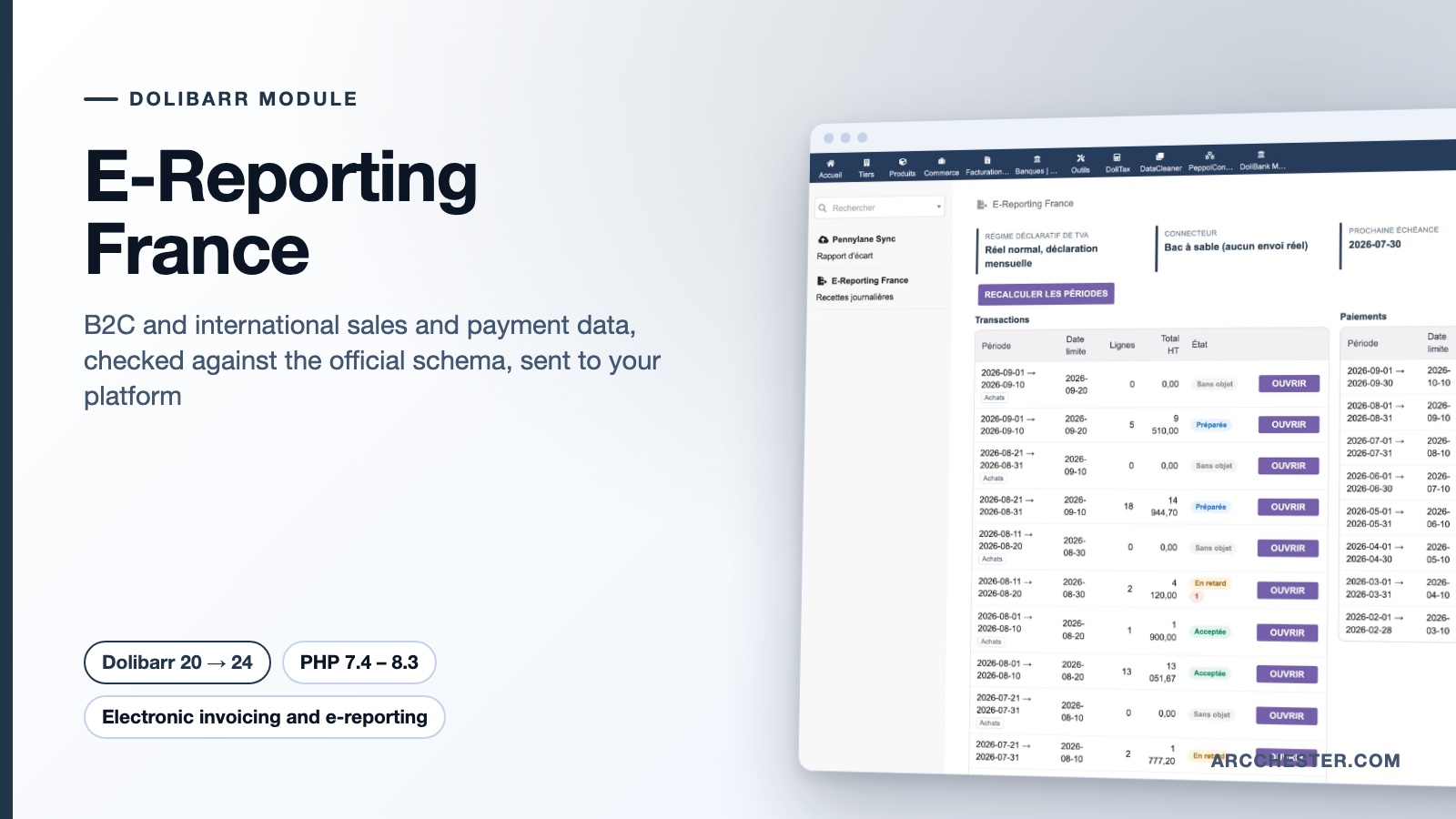
E-Reporting France · FOR DOLIBARR

E-reporting from Dolibarr.
The half Factur-X does not cover.

The module classifies every sale and purchase, aggregates consumer sales by day, computes the two filing calendars of your VAT regime, builds the official flow 10 XML, validates it against the tax authority schemas and hands it to your platform.

Dolibarr 20 → 24PHP 7.4 – 8.3Version 1.0.1€149 excl. VATOn Dolistore

E-Reporting France — module for Dolibarr
Flow 10 XML, XSD-checkedTwo filing calendarsRules shown per operationSandbox and manual upload
YOUR DAILY WORKFLOW

What changes once the module is active.

01

The message is checked before it leaves

The XSD schemas of flow 10 (external specifications v3.2 of 30/04/2026) are embedded in the module. Every message is validated against them before being written or sent: a non-conforming message never reaches the platform.

02

Deadlines you no longer compute by hand

Transactions and payments follow two separate calendars that depend on your VAT regime (monthly or quarterly standard, simplified, exemption). The dashboard shows both, with the next deadline, late periods and periods with nothing to report.

03

Every decision is explained

Each operation is classified as domestic B2B, consumer sale, international sale or purchase, or out of scope, and the rule that produced the decision is displayed. A per-third-party override forces a category; a line can be excluded with a reason.

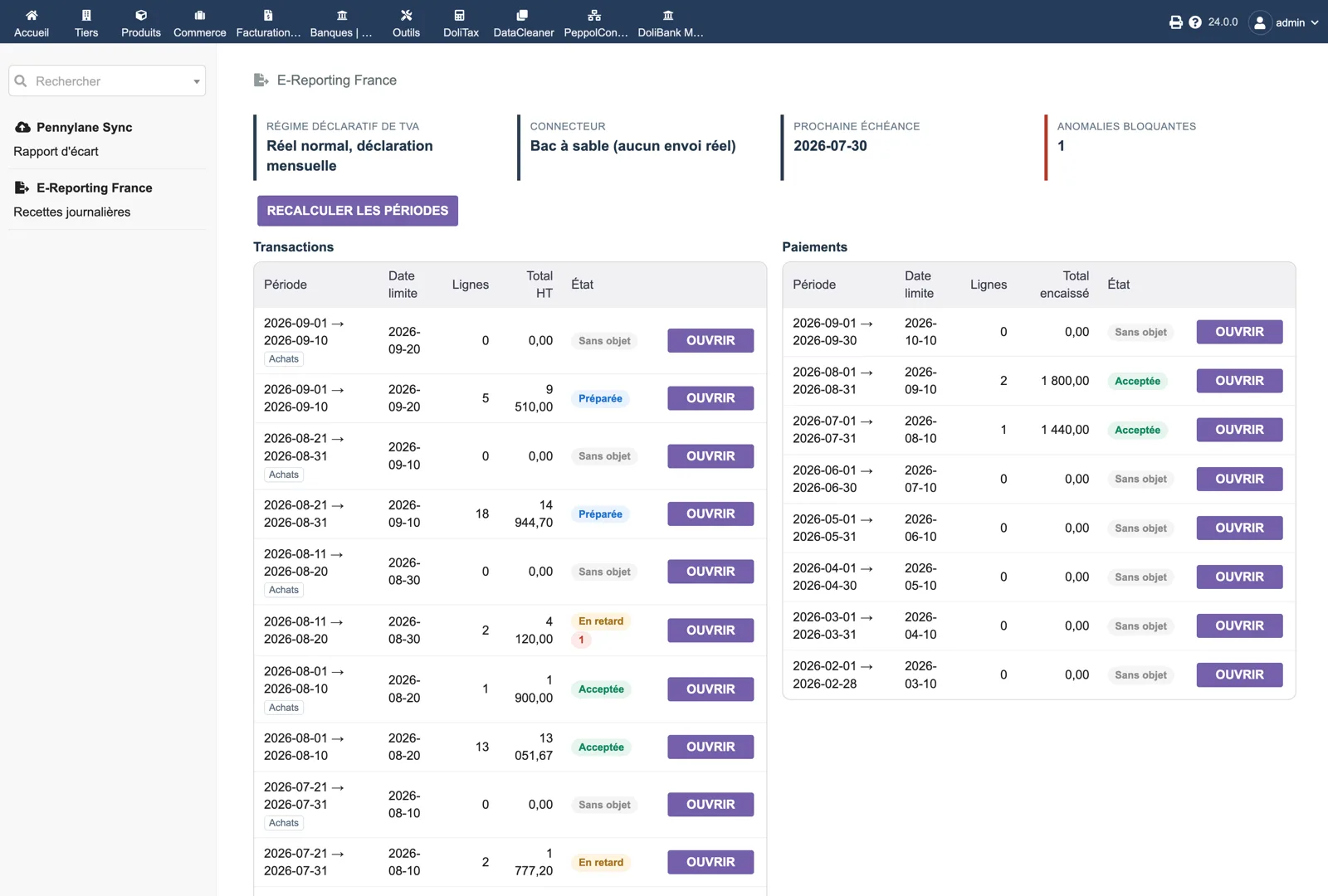
Two calendars side by side — Dolibarr
Actual module interface in Dolibarr · Demonstration data. Click to enlarge.
INSIDE THE MODULE

Two calendars side by side

The dashboard header shows the VAT regime (standard, monthly return), the connector (sandbox, nothing really sent), the next deadline and the number of blocking anomalies. On the left, ten-day transaction periods (sales and purchases) with lines, total excl. VAT and status: nothing to report, prepared, late, accepted. On the right, monthly payment periods with the amount collected.

Browse all screens →

Know exactly what happens.

WorkflowTriggerResult in Dolibarr
CollectionValidated customer invoices, credit notes and down payments; international supplier invoices; point-of-sale sales; daily takings entered or imported from CSV; paymentsOperations are gathered per period and classified with the rule displayed.
AggregationConsumer salesReported aggregated by day, currency and category (flow 10.3); international operations reported invoice by invoice (10.1).
PaymentsEach payment, under cash-basis or mixed VAT chargeabilityThe service share is split by VAT rate in whole cents (largest remainder); partial and multi-invoice payments included. Nothing is produced under the debits option.
AnomaliesPreparation of a periodBlocking anomalies (missing filer SIREN, missing counterparty country, amount mismatch, payment without invoice) stop the sending; warnings let it through and stay visible.
TransmissionButton “Send”, or the automatic sending jobSandbox, manual upload (you upload the file yourself), generic REST API over HTTPS, or the connectors of PA Transmission if installed. Each attempt and answer is journalled.
CorrectionResending an accepted periodA corrective transmission with a new identifier; a replay after rejection also gets a fresh identifier.

Before you choose.

Do I also need Factur-X France or PA Transmission?

E-reporting concerns operations without an electronic invoice: sales to consumers, international operations and payment data. Your B2B invoices to French businesses go through Factur-X France and PA Transmission instead. When PA Transmission is installed, E-Reporting France can reuse its connectors without any new setting.

Which flows and formats are produced?

The official flow 10 XML: 10.1 international invoices, 10.2 payments linked to an invoice, 10.3 aggregated consumer transactions, 10.4 aggregated payments. A control CSV and a JSON for the generic API are also available. The XML is validated against the embedded XSD before it is written; the Message tab states whether it conforms and shows the transmission id and checksum.

What if a period has no operation?

No message is produced and the period is marked “Nothing to report”; it can never become late. The module follows the 2026 specifications on this point.

How are my VAT regime and chargeability used?

The VAT filing regime drives both calendars (ten-day periods for transactions under the monthly standard regime, one monthly period for payments). VAT chargeability (debits, cash basis or mixed) decides whether payment data is produced; the setting is shared with DoliTax when that module is installed.

I run a till outside Dolibarr. Can I declare its takings?

Yes. The “Daily takings” page lets you enter the daily total per VAT rate and nature, or import a CSV (date; nature; rate; net amount; VAT amount; transaction count; label). Point-of-sale sales from TakePOS are included automatically unless you switch them off.

What do the scheduled jobs do?

Three jobs: preparation of elapsed periods (creates periods, classifies operations, detects anomalies), automatic sending of prepared periods without blocking anomaly, and reminders with status polling. Reminder e-mails go to the addresses you set, three days before the deadline and on the day.


NEXT STEP

Get the module on Dolistore.

€149 excl. VAT · one-time purchase · version 1.0.1

Dolistore is the official Dolibarr marketplace: purchase, download and invoicing happen there. You receive the module archive, French and English translations, e-mail support at support@arcchester.com and the updates published on Dolistore.

Price as published on Dolistore on 9 October 2026; the listing shows the current price and conditions. Dolibarr 20 → 24 · PHP 7.4 – 8.3.